Sunday, October 30, 2011
Urgent Message

Monday, September 12, 2011
“After the storm” a roundtable discussion of disaster planning
While all of us have some type of disaster plan in place, even if it’s in our head, it’s a rare occasion that we can evaluate our plans with the fresh hindsight of an actual disaster. Hurricane Irene has provided us when one of those rare opportunities. Systems Support Group, Inc. will be presenting 2 roundtable discussions that will enable us all to be better prepared should another disaster occur.
These roundtables will bring together businesses that lived through power outages, internet outages, flood damage etc. We will have an open discussion on how well existing disaster plans worked and what can be done better. Bring your hurricane Irene stories and questions.
The first roundtable will be held at the Waterbury Courtyard Marriot on Thursday September 29th at 8:30am to 10:00am. Reservations can be made by calling our office at 860-496-8684.
The second roundtable will be held at the Northwest Connecticut Chamber of Commerce in Torrington on Wednesday October 12th at 8:30am to 10:00am. Limited reservations for non-chamber members are available by contacting our office at 860-496-8684.
Thursday, August 25, 2011
Prepare for Irene
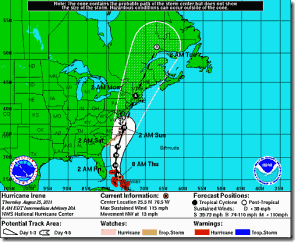
It looks like hurricane Irene is heading in our direction. It’s current track has the eye passing roughly through the middle of the state as a category 1 hurricane on Sunday. Of course, these things can change at any time.
Hurricanes present several issues for IT equipment. The most common are flooding and wind. Flooding can be a problem for IT equipment that is on the floor especially in low lying areas. Make sure any of your IT equipment that fits this scenario is lifted up off the ground or moved completely. Water and electronic equipment do not play well together! Remember, that hurricanes can cause water damage in other ways besides flooding. Water can come in through roofs and windows as well.
Wind damage is the next problem. In addition to causing physical damage to your building, wind can take trees down and spread debris around. This in turn can cause power outages, which of course is a problem for your IT equipment.
Because this storm looks like it will hit over the weekend, it would be best to power off as much of your IT equipment as possible. If you are on our 24x7 monitoring service, please notify us that you will be powering down. If you can not power your equipment down, make sure it is in as safe an area as possible. Power surges can cause the most damage to your IT equipment. Any devices that are left on should, at the very least, be connected to a good UPS (Uninterruptable Power Supply). Realize that these will only be good for about 15 or 20 minutes.
It would be a good idea to make sure you have a current backup offsite. For our Clients that use or remote backup service, we will be doing a basic test restore of a sample of your data by the end of the day Friday.
Make sure you have a good communications link with your employees and make sure your insurance information is close at hand. Mostly importantly, safety first! Make your preparations before hand. If you find equipment under water don’t try to move it until the storm has passed, even if the power is out! The power may come back on at any time and can prove deadly.
Hopefully, this storm will pass without any major issues. However, it is best to be prudent and prepare as much as possible. This would be a good time, where possible, to shut your IT equipment off. Pull out that Disaster Plan and review it before the storm hits. If you have questions about your specific environment, give a us a call.
This is a pretty good site for information about Hurricane Irene.
Thursday, August 04, 2011
One way to avoid disasters is to not create them

There is a whole set of other types of disasters that are controllable. Not implementing proper security procedures, not replacing critical old equipment, using the server room as a storage area, not installing UPSs on critical equipment, and other “controllable disasters” should never happen. We often hear “we simply can’t have any down time”. At the same time, the cleaning people use the server room to store their cleaning supplies, or the server room is 100 degrees, and the server in that server room is 10 going on 11 years old. My question is if you can’t have any down time, why are you asking for it?
In fact, thinking over the last 28 years that we have been supporting Clients, my guess is that about 75% of the “disasters” that have been encountered were self inflicted. These self inflicted disasters cost time and money. Usually a lot more than the preventative measures that could have been taken to avoid them. So take a look at your IT environment. What disasters are you inviting in?
Friday, July 22, 2011
Ray Promoted To Service Manager
As everyone already knows, Ray has been doing an excellent job for us since he came onboard a few years back. His attention to our Client’s needs has made us a better company. It’s as simple as that. He has helped us organize our growing helpdesk and has kicked all our butts regarding documentation. He has proven himself in working with our Clients and with our staff.
As my plate has been overflowing, it has come time for me to concentrate on our business processes and growth. With that in mind, I have promoted Ray to Service Manager. He is now responsible for all aspects of our providing the best support we can to our Clients. In actuality Ray has already been doing this for a while now. We are just making it official. One of his first tasks has been to get our service scheduling process more formalized. As many of you already have noticed, we have been much more proactive at communicating with you regarding the status and scheduling of your service tickets. The response for the few changes he has made so far has been great. Look for more!
As a reminder, the best ways to request support are:
- Phone – Call our 800 number – Select 1 for support
- Email – Send an email to support@ – A ticket is created and you are notified
- Client Portal – Sign into our Client Portal – Create tickets, check on ticket status, check your inventory, licenses, invoices, etc
- Fax – Yes, we still get support request though fax
Please do not send new support requests to any of us individually via email or voicemail. Use the support accounts as they are handled immediately whereas an individual email or voicemail will have to wait until the individual gets a chance to receive it. With illness, vacations, training, meetings, etc., that can take longer than we would like. As much as possible keep all correspondence regarding a ticket attached to the ticket. That simply means reply to the ticket emails that come from the system or add “ticket#XXXXXX/” (XXXXXX=the actual ticket number) to the Subject line of any email to attach that email to the ticket. (Do not include the quotes)
We are constantly striving to provide the best support possible for you, our Clients. As Service Manager, Ray will be a great force in meeting that goal.
And me? Well, I have a bunch of things up my sleeve that I will now get time to get started or completed. You will hear about several of them very soon.